Creating a Keycloak theme with AI, deployed on Clever Cloud
This article covers how I created and deployed a custom Keycloak theme on Clever Cloud for the DICRIM numérique backoffice, using Claude Code as an assistant. From the first question to the last production bugs, I’ll walk you through everything — including the mistakes.
Context
DICRIM numérique is a Spring Boot application deployed on Clever Cloud that allows local authorities to create and share their Municipal Information Document on Major Risks. Backoffice user authentication is handled by Clever Cloud’s Managed Keycloak addon (version 26.1.2).
By default, Keycloak displays its own login pages — functional, but generic. The goal: replace them with pages styled in DICRIM numérique’s colours for a consistent experience.
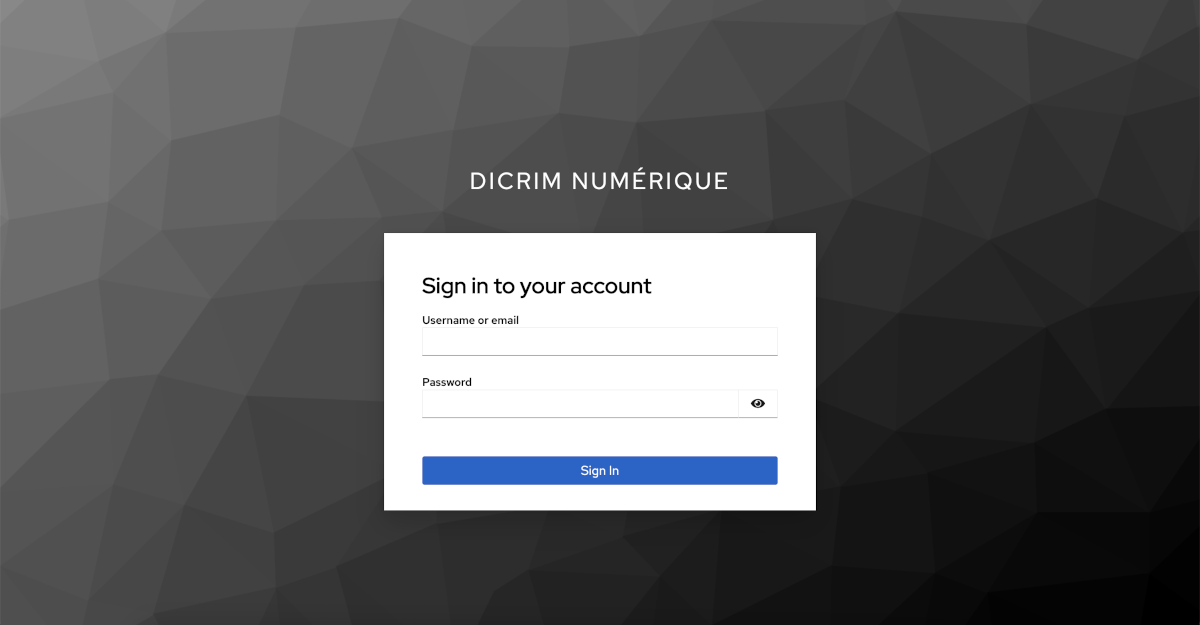
“What do you need to get started?”
Everything began with this question to Claude Code:
“I need to create a Keycloak theme for this project (we use Keycloak for user auth). Can you help me with that? What info do you need to get started?”
Rather than diving straight in, the assistant started by exploring the project — reading SCSS files, noting the custom Bootstrap colour palette, locating the fonts — before asking the genuinely useful questions:
- Keycloak version? → 26.1.2
- Approach? → Native Freemarker (not Keycloakify/React)
- Pages to customise? → Login, Account, Email
- Deployment? → JAR provider, in a
keycloak/folder at the project root
These choices shaped the entire architecture of the solution.
Why native Freemarker instead of Keycloakify?
Keycloakify is a modern tool for building Keycloak themes in React/TypeScript. It’s powerful, but it means a separate JS sub-project, additional front-end tooling, and a learning curve.
For this project, the native Freemarker approach is a better fit:
- No JS dependencies to manage
- Simple
.ftltemplates to maintain - Compatible with the existing Maven/Java stack
The colour palette: extracted from code, not invented
Rather than asking for the colours, Claude Code extracted them directly from the project’s SCSS files:
/* src/main/scss/bootstrap/_variables.scss */
$primary:   #133478;  /* navy blue */
$secondary: #C34A09;  /* orange */
$success:   #009686;  /* green */
$info:      #E2EEFA;  /* light blue */
Same for fonts: the Poligon-*.otf files were located in src/main/fonts/ and bundled directly into the theme JAR via maven-resources-plugin.
Project structure
The theme is a standalone Maven project in the keycloak/ folder at the repository root, independent from the main Spring Boot project.
keycloak/
├── mvnw / mvnw.cmd                     ← Maven Wrapper
├── pom.xml                             ← Build → KC provider JAR
└── src/main/resources/
    ├── META-INF/
    │   └── keycloak-themes.json        ← Theme declaration
    └── theme/dicrim/
        ├── login/                      ← Authentication pages (FTL)
        │   ├── template.ftl            ← Master layout
        │   ├── login.ftl
        │   ├── logout-confirm.ftl
        │   ├── resources/css/login.css
        │   └── ...
        ├── account/                    ← User account console
        │   ├── theme.properties
        │   └── resources/css/account.css
        └── email/                      ← Transactional emails
            ├── messages/messages_fr.properties
            └── html/*.ftl
“I don’t have Maven installed”
A practical detail: the project had no local Maven installation. Immediate solution — copy the Maven Wrapper (mvnw, mvnw.cmd, .mvn/) from the main Spring Boot project, which already has one. Same version (Maven 3.9.9), same behaviour: the wrapper downloads it automatically on first run.
cd keycloak && ./mvnw package
# → target/dicrim-keycloak-theme.jar
The login page design
Split-screen layout
The login page picks up the backoffice’s visual language with a split-screen layout:
- Left panel: navy blue background (
#133478), application name, icon - Right panel: form on a light background, styled fields, navy blue button
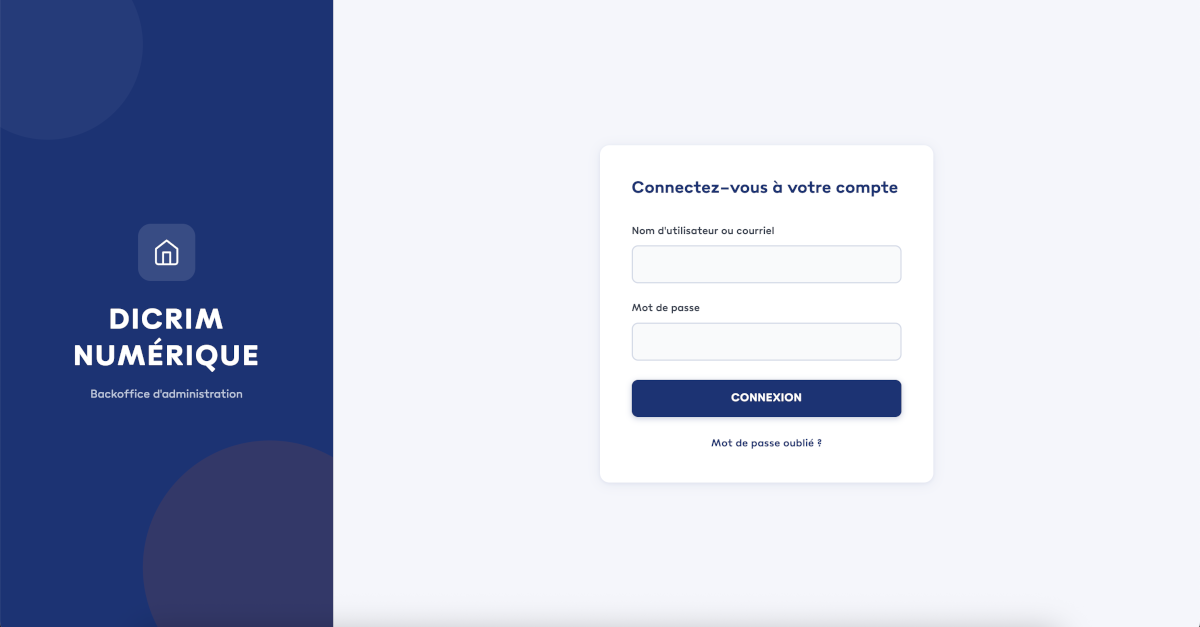
template.ftl: the master layout
In Freemarker, template.ftl acts as the master layout. It defines a registrationLayout macro that every page template imports:
template.ftl          ← shared HTML, CSS, split-screen, alerts
    ↑ imported by
├── login.ftl                 login
├── login-reset-password.ftl  forgotten password
├── logout-confirm.ftl        logout confirmation
├── login-otp.ftl             OTP code
├── info.ftl / error.ftl      generic pages
└── ...
Each template calls the macro, passing its title and content:
<#import "template.ftl" as layout>
<@layout.registrationLayout header=msg("loginAccountTitle")>
    <form action="${url.loginAction}" method="post">
        <!-- form fields -->
    </form>
</@layout.registrationLayout>
The bugs — because there always are some
Bug #1 — ; section: incorrect generated code
First JAR deployment, first 500. The log is unambiguous:
Caused by: freemarker.core.ParseException: Syntax error in template "template.ftl" in line 1, column 106:
Encountered ";", but was expecting one of these patterns: ".", "..", "?", ...
Loop variables in Freemarker
Keycloak 26 ships with Freemarker 2.3.32. This version supports loop variables — a mechanism that lets a macro pass values back to its nested content.
The standard syntax: in the definition, the macro emits values via <#nested val>; in the call, the calling template receives them with ; var:
<%-- Definition: the macro passes a value to its content --%>
<#macro registrationLayout>
    <#nested "header">
    <#nested "form">
</#macro>

<%-- Call: the template receives the value in the "section" variable --%>
<@layout.registrationLayout ; section>
    <#if section == "header"><h2>Title</h2></#if>
    <#if section == "form"><form>...</form></#if>
</@layout.registrationLayout>
The ; var belongs to the call (@), not the definition (#macro).
The problem: Claude mixed the two up
Claude generated a template.ftl with ; section in the macro definition — which is not valid Freemarker:
{{!-- Generated code — incorrect --}}
<#macro registrationLayout ...; section>
    <#nested "header">   {{!-- calls the "header" block of the calling template --}}
    <#nested "form">     {{!-- calls the "form" block of the calling template --}}
</#macro>
The parser stops at column 106, where it encounters ; in an unexpected context. It happens — the AI confused the caller’s syntax with the template’s, and no local test caught it before deployment.
Fix: go back to standard Freemarker. The title (header) becomes an explicit string parameter of the macro, and <#nested> handles a single content block:
{{!-- Our template.ftl --}}
<#macro registrationLayout header="" ...>
    <h2>${header}</h2>
    <#nested>
</#macro>

{{!-- Our pages --}}
<@layout.registrationLayout header=msg("loginAccountTitle")>
    <form>...</form>
</@layout.registrationLayout>
Related pitfall: parent theme templates that are not overridden (e.g. logout-confirm.ftl) keep using the old ; section pattern. They load our template.ftl, but since our macro doesn’t provide a value for section, the variable is null and the template crashes. Every parent template that uses this pattern must be overridden in our theme.
Refs: Freemarker —
#macrodirective and loop variables · Keycloak 26 — theme customisation
Bug #2 — locale: variable absent depending on realm config
Second deployment, second 500 — a different one this time:
Caused by: freemarker.core.InvalidReferenceException:
==> locale  [in template "template.ftl" at line 3, column 15]
- Failed at: ${locale.currentLanguageTag}
Cause: when internationalisation is disabled on the Keycloak realm, the locale variable is not injected into the Freemarker context. Directly accessing ${locale.currentLanguageTag} throws an InvalidReferenceException.
Fix: Freemarker’s ! operator allows defining a default value — wrapping the whole expression in parentheses covers the entire chain:
{{!-- ❌ Crashes if locale is absent --}}
<html lang="${locale.currentLanguageTag}">

{{!-- ✅ Default 'fr' if locale is absent --}}
<html lang="${(locale.currentLanguageTag)!'fr'}">
The subtlety:
${locale.currentLanguageTag!'fr'}only covers the last step of the expression. Iflocaleitself is absent, it still crashes. The entire expression must be wrapped in parentheses:${(locale.currentLanguageTag)!'fr'}.
Bug #3 — Account theme invisible in KC admin
The dicrim theme did not appear in the list of available themes for the Account theme in Realm settings → Themes.
Cause: the wrong parent value in account/theme.properties. In KC 26, the native account theme is called keycloak.v3. If the declared parent does not exist, KC silently ignores the theme in the list.
| KC version | Default account theme |
|---|---|
| ≤ 18 | keycloak |
| 19 – 25 | keycloak.v2 |
| 26+ | keycloak.v3 |
Practical rule: use as parent exactly the name shown in the KC admin list for the relevant theme type — no guessing.
# account/theme.properties
parent=keycloak.v3
styles=css/account.css
Bug #4 — Logout crashes
Login working, account theme activated — but logout returns a 500:
Failed to process template logout-confirm.ftl
Caused by: freemarker.core.InvalidReferenceException:
==> section  [in template "logout-confirm.ftl" at line 3, column 10]
~ Reached through: @layout.registrationLayout; section  [in template "logout-confirm.ftl"]
This is a consequence of Bug #1: logout-confirm.ftl comes from the parent theme and uses the old ; section pattern. It calls our template.ftl, section is null, it crashes.
Fix: override logout-confirm.ftl in our theme. And while at it, override all templates likely to be triggered in everyday use:
login/
├── logout-confirm.ftl      ← logout
├── login-otp.ftl           ← two-factor authentication
└── login-page-expired.ftl  ← expired session
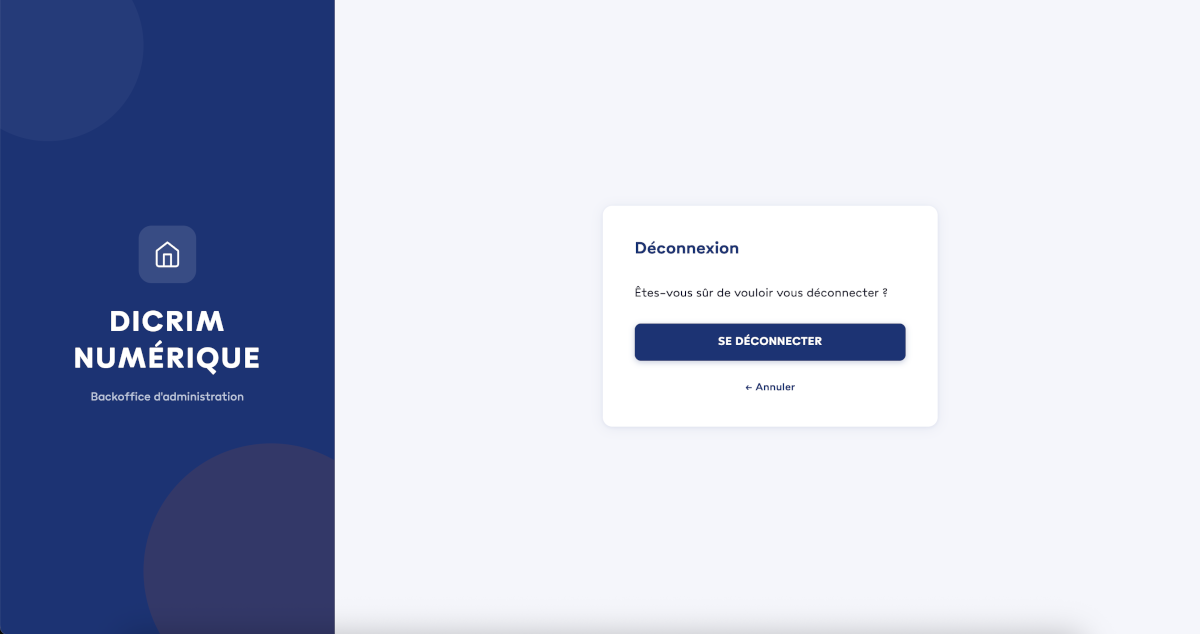
The account theme: just CSS
The account management console (/account) in KC 26 is a React SPA based on PatternFly 5. It cannot be modified with Freemarker templates — it self-generates on the client side.
However, KC allows injecting an additional stylesheet. Overriding PatternFly CSS variables is enough to apply DICRIM colours:
:root {
    --pf-v5-global--primary-color--100: #133478;
    --pf-v5-c-button--m-primary--BackgroundColor: #133478;
    --pf-v5-c-masthead--BackgroundColor: #133478;
    --pf-v5-global--link--Color--hover: #C34A09;
    --pf-v5-global--success-color--100: #009686;
    /* ... */
}
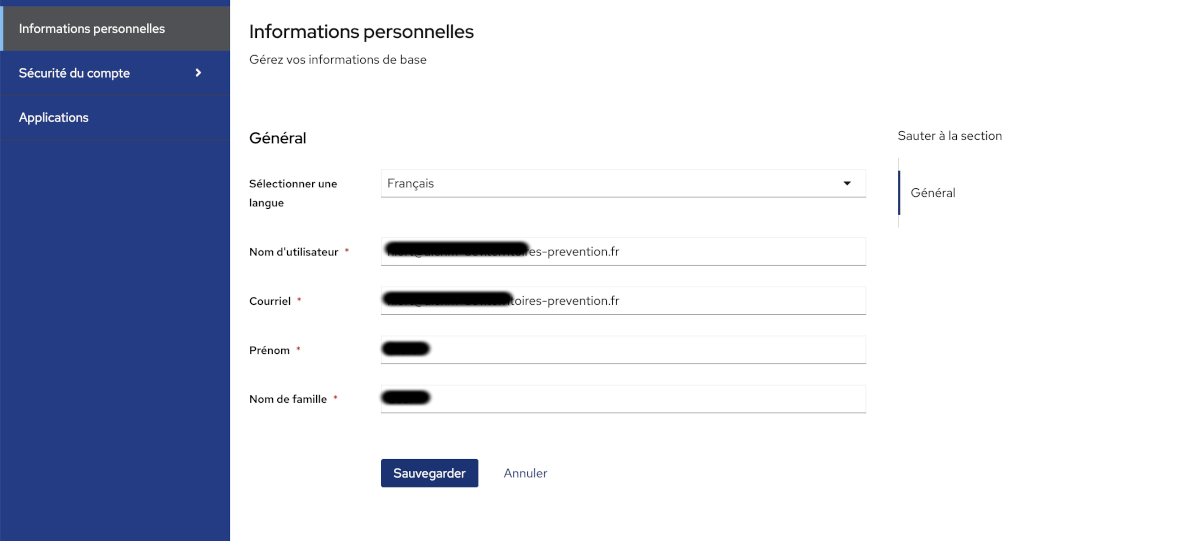
The email theme
Three HTML templates in DICRIM colours for transactional emails:
email-verification.ftl— address verification on account creationpassword-reset.ftl— password reset (orange button)executeActions.ftl— required actions requested by an admin
A messages_fr.properties file translates email subjects and bodies into French.
Deployment on Clever Cloud
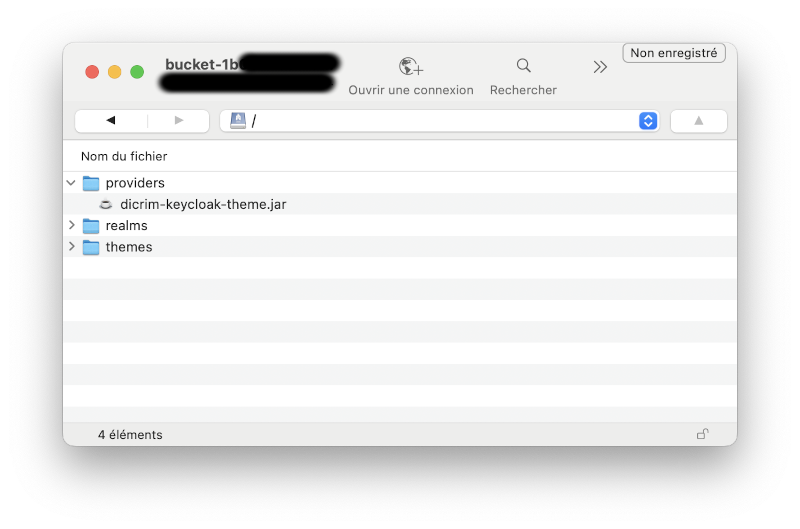
Clever Cloud’s Managed Keycloak addon stores themes and plugins in a FSBucket associated with the KC instance. Two folders are available:
themes/— themes as unzipped foldersproviders/— JARs (plugins, packaged themes)
Our theme is a provider JAR: it goes in providers/.
Full procedure:
# 1. Build the JAR
cd keycloak && ./mvnw package
# 2. Upload target/dicrim-keycloak-theme.jar
#    to providers/ in the FSBucket via the Clever Cloud console
# 3. Restart the Keycloak addon from the Clever Cloud console
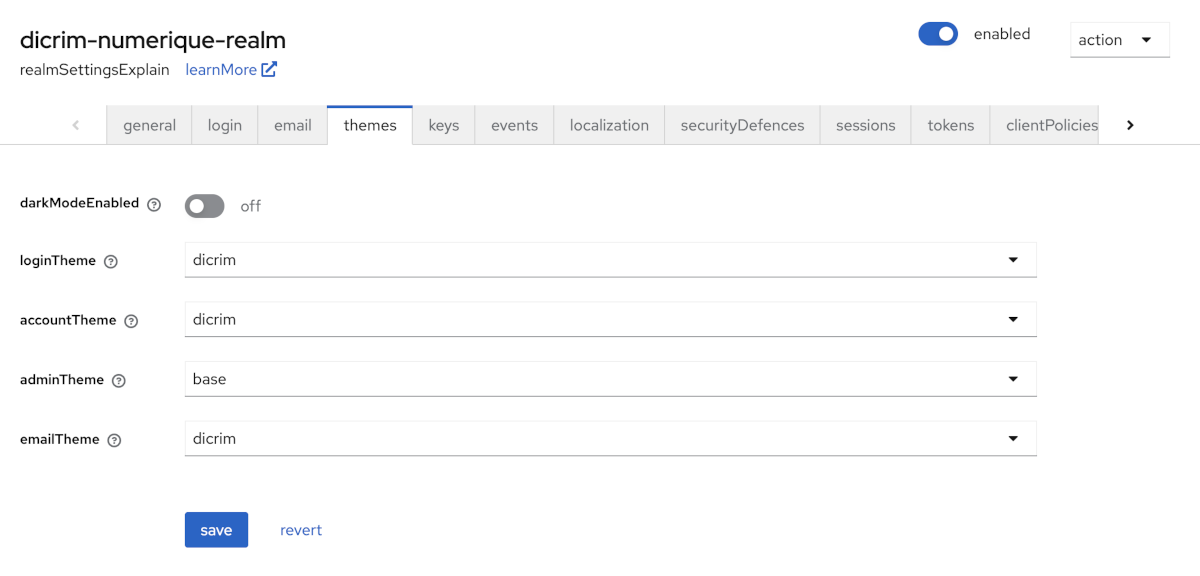
# 4. In KC admin: Realm settings → Themes
#    Login theme   → dicrim
#    Account theme → dicrim
#    Email theme   → dicrim
Clever Cloud advantage: no need to run
kc.sh buildmanually. The Quarkus rebuild is handled by the platform when the addon restarts.
Key takeaways
On Keycloak:
- The account parent theme name changes with every major version (
v2→v3) — always check in admin before coding - In KC 26, the Freemarker
; sectionsyntax in a macro definition does not parse — the pattern must be adapted - Any optional KC variable (
locale, etc.) must be protected with Freemarker’s!operator - Overriding
template.ftlmeans overriding all parent theme templates that use it — otherwise they crash on first use
On the AI-assisted approach:
- The AI explores existing code before generating (colours extracted from SCSS, fonts found automatically) rather than asking for information that’s already available
- Bugs are inevitable on subjects with sparse up-to-date documentation — fast iteration is key
- Keycloak error messages are precise and sufficient for diagnosis: line, column, missing variable
On Clever Cloud’s Managed Keycloak:
Honestly, it’s a great service. Running a Keycloak instance in production yourself is a real operational burden: updates, database management, backups, monitoring… Clever Cloud handles all of that. Each instance is dedicated (no shared resources), comes with its own PostgreSQL database and FSBucket, and supports OAuth 2.0, OpenID Connect, and SAML v2 out of the box.
For a project like DICRIM numérique, the benefit is tangible: you focus on the customisation — the theme, the realm configuration — rather than on operations. And the theme deployment workflow itself is refreshingly simple: upload a JAR to the FSBucket, restart the addon. No manual kc.sh build, no server to administer. Highly recommended.